

Developer
Quickly open a project script in your editor or prepare a shortcut to a local build command — without hunting for the path each time.
Ctrl Deck V1.7 — Developer actions
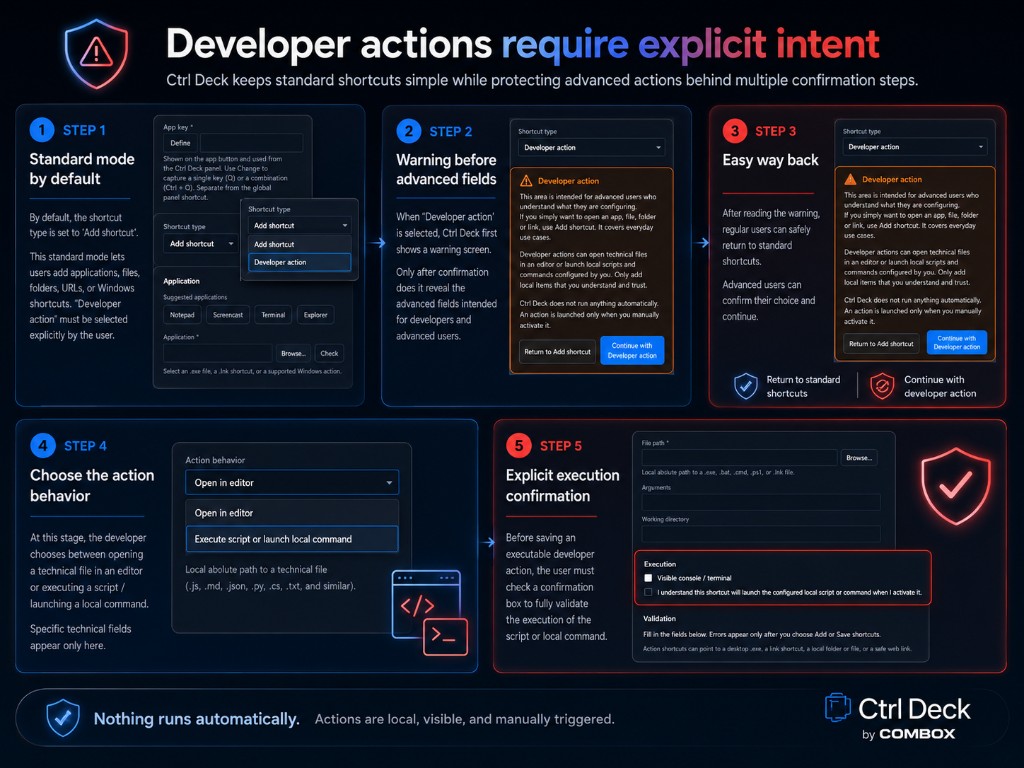
By default, Ctrl Deck stays simple: apps, files, folders, URLs and Windows shortcuts. Developer actions let technical users centralize local shortcuts to scripts, commands or executables — always visible, always triggered manually, never in the background.
This page is for developers, IT teams, integrators and digital agencies who want Windows developer shortcuts without confusing quick access with automation.
Simple by default
Ctrl Deck is first a Windows shortcut manager. Developer actions are added on top — they do not replace this foundation.
What Developer actions add
Ctrl Deck Developer actions let you prepare local technical access that the user triggers from the panel.
These are prepared Windows PowerShell shortcuts, local commands or editor openings — not silent execution or hidden macros.
Explicit intent and safety
Ctrl Deck does not create, modify, analyze or interpret scripts. Nothing runs automatically.
Use cases
Quickly open a project script in your editor or prepare a shortcut to a local build command — without hunting for the path each time.
Manually run a local diagnostic command, verification tool or team-approved administration script.
Centralize access to deployment notes, client tools or environment scripts without mixing them with standard business shortcuts.
Group technical shortcuts for web, QA or ops teams: editors, local scripts, pre-production commands.
Clear boundaries
Developer actions do not turn Ctrl Deck into an automation platform or remote execution tool.
Full 7-day trial, then limited free mode or one-time license. See download options on the product page or Microsoft Store — Developer actions stay controlled in every version.