


Available now on Microsoft Store
Ctrl Deck

Secure installation from the official Microsoft Store listing.
Discover Ctrl Deck, COMBOX’s current flagship product: a visual panel to organize shortcuts, applications, files, folders, URLs and local actions on Windows.
Ctrl Deck turns repeated actions, commands and app shortcuts into one clean visual panel.
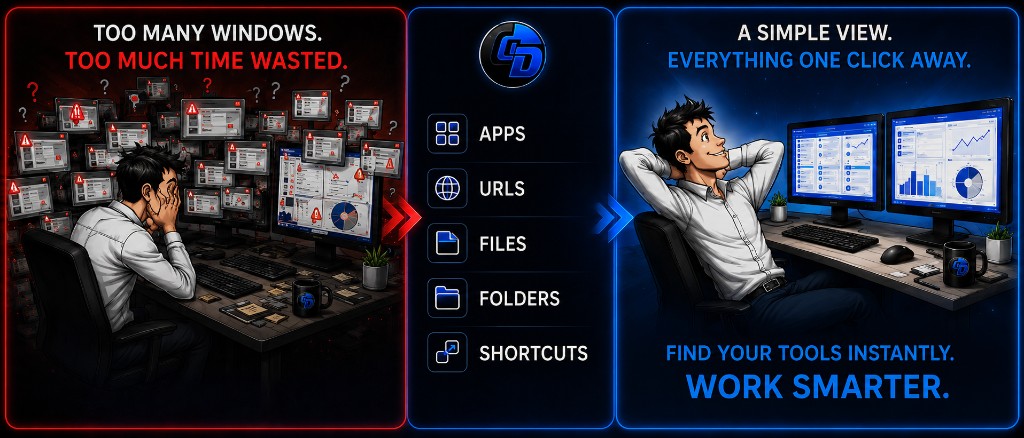
Ctrl Deck V1.7 helps you group your apps, files, folders, URLs, shortcut groups, and Workspaces in a clear, fast interface.
The goal is simple: spend less time searching across Windows and get back to your work tools in seconds.
On first launch, Ctrl Deck can import shortcuts from the Windows Desktop and taskbar. You choose what to keep, so you do not start from scratch.
Create editable shortcut groups to organize your resources by project, client, routine, business use, or daily activity.
Ctrl Deck V1.7 can import URLs currently open in Google Chrome. You can then open them, move them, group them, or add them to your Workspaces.
The APPS section can scan the applications and utilities available on your computer. You can search for an app, launch it, or add it to a group or Workspace.
A Workspace groups the items needed for a work context: apps, files, folders, and URLs. You can create one manually or from a capture of your open environment.
Add items manually or drag shortcuts directly into your Workspaces to complete them faster.
Workspace capture helps turn an open environment into a reusable work area: client, project, daily routine, ERP, CRM, technical setup, or sales workflow.
Live Spaces help recover a work area after an interruption or urgent task. If a Live Space matches an organization you use often, you can turn it into a Workspace.
Drag and drop makes it easier to organize your shortcuts, files, folders, URLs, groups, and Workspaces naturally.
You can assign a keyboard shortcut to a group or an app. Once everything is ready, some items can be launched without opening the panel.
Ctrl Deck V1.7 can also hold shortcuts or actions useful for technical profiles: scripts, development tools, project folders, local environments, or frequent resources. The goal stays the same: group what you really use in your Windows work environment without overloading the Desktop or taskbar.
Read the official Ctrl Deck FAQ
In this video, you will see the main first steps with Ctrl Deck V1.7: import, groups, APPS, Chrome URLs, Workspaces, capture, drag and drop, Live Spaces, and keyboard shortcuts.
The video is planned with multilingual subtitles for the French, English, Spanish, Portuguese, Italian, German, and Simplified Chinese versions of the site.
Install Ctrl Deck from Microsoft Store or read the official FAQ to learn more.
Ctrl Deck centralizes your everyday access in a clear interface — without automating your actions for you.
Ctrl Deck complements your work environment by making your Shortcuts, Workspaces and Live Spaces easier to find and launch.
Secure installation from the official Microsoft Store listing.
A Windows app to find your apps, files, folders, links, shortcuts, Workspaces — and MUCH MORE — in seconds.
View Ctrl DeckContact point for COM’BOX software, applications and services.

COMBOX is an independent software publisher. Its rare mastery of AI — structured workflow, documented evidence, human validation — accelerates design and development. Every important decision remains the responsibility of one person.
Structure, govern, and leverage AI without losing control of the workflow.
COMBOX publishes software by piloting AI — not the other way around.
Based on a comparison with hundreds of millions of users worldwide, which corresponds to only a few hundred comparable profiles.
Most people discover AI through simple conversational use: quick questions, recipes, short texts, immediate answers. This use is useful, but it remains surface-level.
Level 1
Inaccessible to end users
This is the deep model layer: architecture, training, weights, internal limits and emergent behaviors. No user directly drives this level from a conversational interface.
Independent publisher · structured, controlled, verified use
COMBOX does not drive the AI engine. As a publisher, it frames an AI-assisted workflow above simple conversation: rules, project context, evidence, iterations and human decision at every step.
Level 2
Answers, rephrasing, simulated rule obedience
Without a strict framework, AI can claim to understand, rephrase correctly and still fail to produce verifiable proof.
Level 3
Quick question, recipe, short text
Useful for an immediate answer, but often limited to surface-level use.
COM’BOX has built something different: a structured workflow for designing, coding, documenting and delivering software. The material foundation: more than 4,000 lines of rules, protocols, archives, validations, code, corrections, tests and real deliverables — carried today by one person.
An unframed AI can flatter, improvise, answer beside the point, or claim it can do something it cannot truly do.
COMBOX’s first rules were the opposite:

The visual alongside shows the same documented rarity: 0.0009% — every zero matters. Estimated level in the attestation: 5.9 / 6.
COMBOX position: 5.9 / 6
≈ 0.0009% or less
A few hundred comparable profiles worldwide
This 5.9 / 6 positioning is intentional. COMBOX does not aim to turn AI into a fully locked software system: AI must remain a tool we can reason with. The goal is to strongly frame it without removing its analytical capacity.
COMBOX designs and publishes useful software, applications and digital tools built to simplify professional workflows.
COM’BOX, also searched as Combox, is an independent software publisher and digital tools studio.
COMBOX is also preparing future macOS and mobile tools — announced honestly, without claiming immediate availability.